
Connections
A connection is a name, a server, a user, an authentication mode, a root path and a host key policy. Connections live in .vscode/sftp.json in a workspace folder, which means they can be committed and shared; secrets never go in the file. The Connections editor is a form over that file, and so is the importer; hand edits get completion and squiggles from the schema and are picked up live.
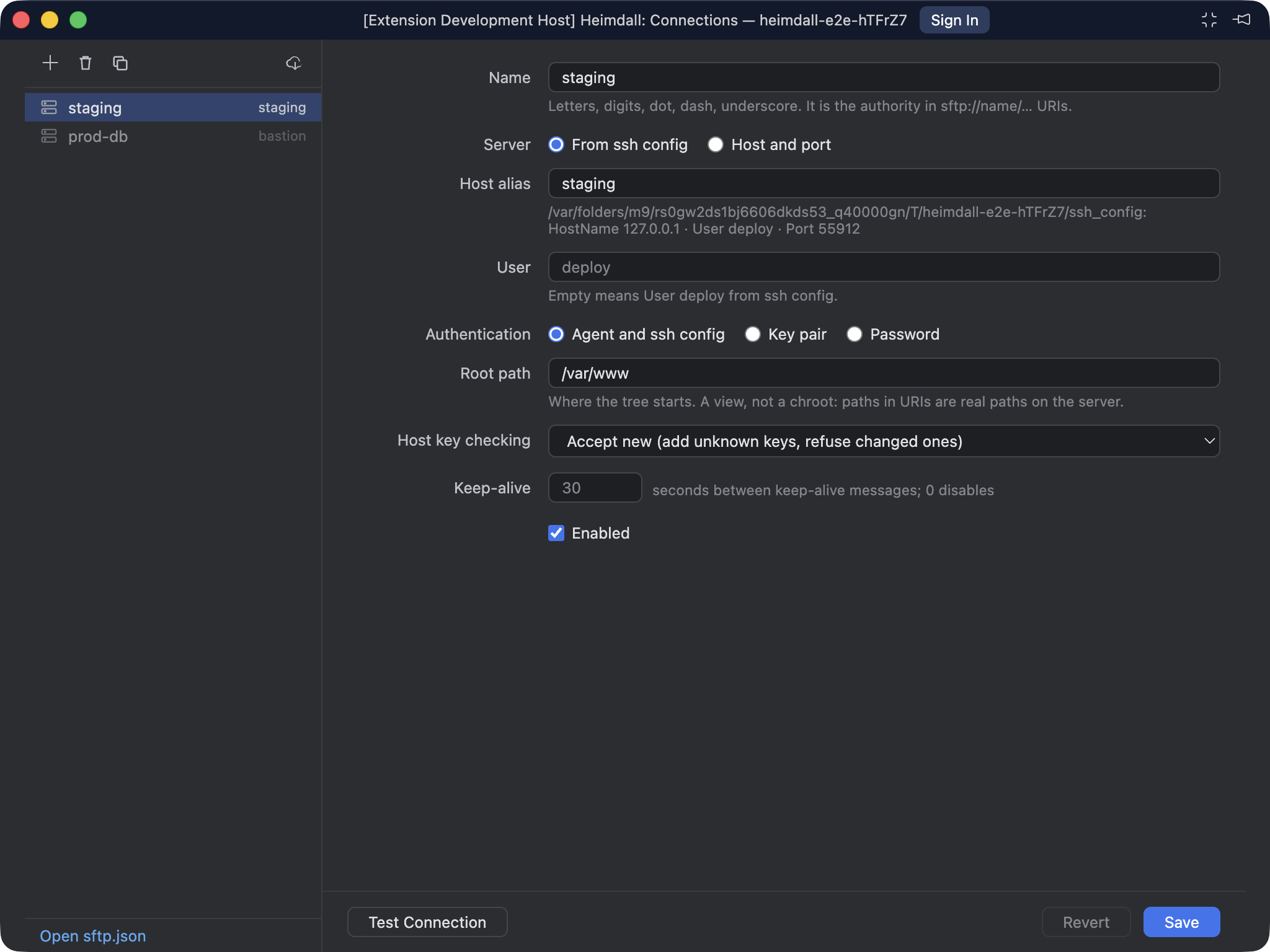
The Connections editor, in its own compact window. A Host alias from ssh config, with the hint saying what the config supplies.
The file
{
  "version": "1",
  "connections": [
    // a Host alias from ~/.ssh/config: HostName, Port, User, IdentityFile, IdentityAgent and ProxyJump come from there
    { "name": "staging", "sshConfig": "staging", "rootPath": "/var/www" },
    // or say it all here
    { "name": "box", "host": "10.0.0.5", "port": 22, "user": "root", "auth": "password", "hostKey": "ask" },
    { "name": "ci", "host": "ci.internal", "user": "deploy", "auth": { "type": "key", "privateKey": "~/.ssh/ci_ed25519" } },
    { "name": "old", "sshConfig": "old", "enabled": false }
  ]
}
| Field | Default | What it does |
|---|---|---|
name |
Unique. It's the authority in every sftp://name/… URI, so letters, digits, dot, dash and underscore only. |
|
sshConfig |
A Host alias. HostName, Port, User, IdentityFile, IdentityAgent and ProxyJump are read from the ssh config at connect time. Explicit fields below override. |
|
host, port |
22 |
The server, when there is no alias, or to override the alias. |
user |
the config's User, else your local user name |
|
auth |
"agent" |
"agent": the SSH agent plus any IdentityFile from ssh config. "password": prompted, and remembered if you say so. { "type": "key", "privateKey": "…" }: a key file, with a passphrase prompt if it needs one. |
rootPath |
/ |
Where the tree starts. A view, not a chroot: paths in URIs are real paths on the server. |
hostKey |
"accept-new" |
See below. |
keepAlive |
30 |
Seconds between keep-alive messages; 0 disables. |
enabled |
true |
false greys the node out without deleting it. |
Comments are allowed, the way VS Code's own .vscode files allow them, and the editor and the importer keep them when they write.
ssh config and ProxyJump
Name a Host alias and Heimdall reads the same config ssh would: Include is followed, Match blocks apply (except Match exec, which is never run), and ProxyJump chains are dialled hop by hop, each hop authenticating with its own key or the agent and each hop's host key checked. The config read is the one Remote-SSH is pointed at (remote.SSH.configFile) unless heimdall.sshConfigPath says otherwise, so a host that works in Remote-SSH works here without retyping.
Secrets
Passwords and passphrases are kept in the OS keychain through VS Code's secret storage. A password is keyed by connection, user and host, a passphrase by connection and key file, so changing the user or the host on a connection asks again rather than reusing the old secret. Heimdall: Forget Saved Password / Passphrase clears everything saved for a connection; removing a connection in the editor does the same.
Host keys
Heimdall checks the server's key against ~/.ssh/known_hosts (or heimdall.knownHostsPath), the same file ssh uses, including hashed entries, wildcards, negation and @revoked lines. The policy is per connection:
hostKey |
Unknown host | Changed key |
|---|---|---|
strict |
refused; the key must already be in known_hosts |
refused |
accept-new (default) |
added without asking | refused |
ask |
a dialog shows the key type and SHA256 fingerprint; Accept adds it | refused |
off |
connects | connects |
A changed key is the case ssh warns about loudly, and Heimdall does the same: the error names the file so you can remove the stale line yourself if the server really was reinstalled.
Importing from ssh config
Heimdall: Import Connections from SSH Config… lists every concrete Host alias (patterns with *, ? or ! are skipped) in a multi-select pick, marks the ones that are already connections, and adds the rest with rootPath /. The same command is on the editor's toolbar and in the empty tree.
Testing
Test Connection, on a tree node or in the editor, dials, reads the root path and disconnects. In the editor it runs against the unsaved form values, so you can check a change before you keep it.